
Managing SEO for a large website often feels like a never-ending task. With hundreds of posts, pages, or products, updating SEO titles and meta descriptions one by one is a huge time drain. The New Yoast SEO Bulk Editor solves this problem by allowing you to manage all your SEO metadata from one central location . This tool saves time and helps maintain consistency across your entire site. We'll show you exactly what this tool offers and how to use it to supercharge your WordPress SEO workflow.
What Is the New Yoast SEO Bulk Editor?
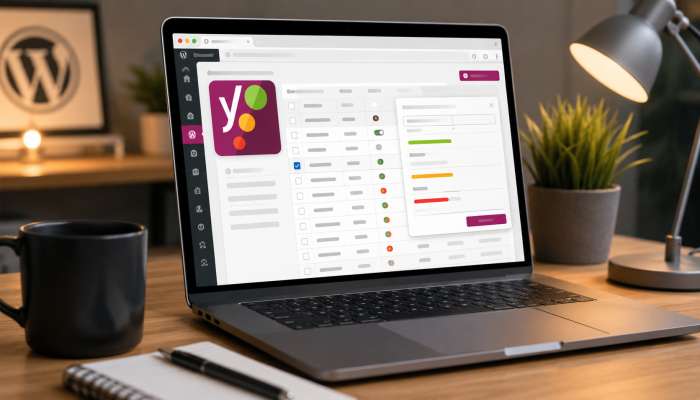
The New Yoast SEO Bulk Editor is a powerful feature within the Yoast SEO plugin. Its core purpose is to provide a single, user-friendly dashboard where you can view and edit the SEO titles and meta descriptions for all your website's content simultaneously .
'Instead of opening each individual post or page to make an SEO change, you can see everything at a glance. This tool, which you can find in the WordPress admin under Yoast SEO > Tools, is essential for anyone who wants to efficiently optimize a site with many pages .
You may also read :- Latest Search Engine Updates: New Google Algorithm Changes
A Look at the New Features in Yoast SEO Bulk Editor
The newest version of the Yoast SEO Bulk Editor comes with significant updates that go far beyond just listing titles and descriptions. These new features make it smarter and more powerful than ever before .
A Cleaner, More Focused Workspace
The updated interface now shows only what matters most. The editor is streamlined to display your SEO titles, meta descriptions, and—a brand new addition—your focus keyphrases . This focused layout lets you quickly see what's missing.
New Search and Status Filters
You can't fix what you can't find. The new filters solve this problem. You can now instantly search for content based on its status or specific keywords .
- Find missing data: Pull up every page that is missing a meta description.
- Filter by status: Show only drafts or published posts.
- Search by keyword: Filter to only show posts targeting a specific focus keyphrase.
This feature is a lifesaver for identifying SEO gaps across a big website.
Dedicated Views for Different Content Types
Large websites often have more than just blog posts. The Bulk Editor now offers a dedicated view for every content type, including pages, products, and custom post types . This means you can bulk edit SEO titles and meta descriptions specifically for your WooCommerce products without seeing unrelated blog posts.
AI Drafts for Metadata (Yoast SEO Premium)
Perhaps the most exciting new feature is the integration of AI. On paid plans like Yoast SEO Premium, you can now let artificial intelligence help you write your metadata . The AI generates drafts for your selected content. You then review each suggestion and approve, tweak, or discard it. This feature saves a huge amount of time while letting you maintain complete control over the final copy .
Expert Opinion: "The addition of AI to the Bulk Editor is a game-changer for agencies and large site owners. It transforms a tedious task into a strategic one," says a seasoned SEO consultant.
How to Use the New Yoast SEO Bulk Editor?
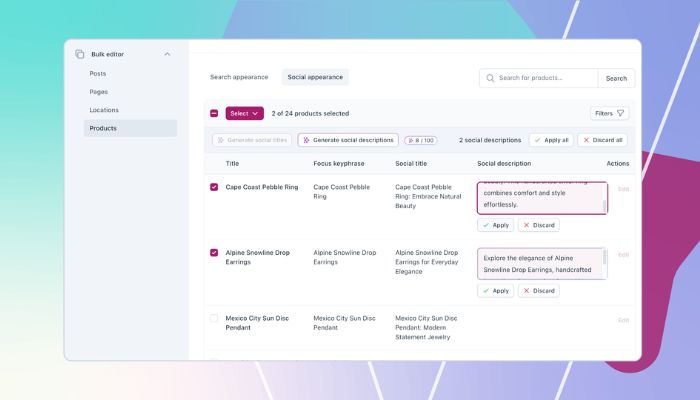
Learning how to use the new Yoast SEO Bulk Editor is straightforward. Here is a simple step-by-step guide to get you started.
Step 1: Accessing the Yoast SEO Bulk Editor
To get started, simply log in to your WordPress dashboard. Then, navigate to Yoast SEO and click on Tools. From there, select the Bulk Editor option . You will find yourself in the new, improved interface.
Step 2: Choosing Between Titles and Descriptions
Writing the title and description In the Bulk Editor you will find two tabs, Titles and Descriptions . Select the tab of interest to update. For instance, click on the "Titles" tab to bulk edit SEO titles, or on the “Descriptions” tab to bulk edit meta descriptions.
Step 3: Filtering Your Content
Before you start typing, use the new filter options to narrow down your list. You can filter by post type (like Posts or Pages) or even by focus keyphrase . This ensures you are only working on the content that needs your attention right now.
Step 4: Making Your Bulk Edits
In the editor, you will see a spreadsheet-like list. Each row represents a post or page. You can click into any field to edit the SEO title or meta description on the spot . This makes it very easy to make changes and see the results all at once.
How to Bulk Edit SEO Titles in WordPress?
If you have a large number of pages, manually editing SEO titles can be overwhelming. Here is how to bulk edit SEO titles in WordPress using the New Yoast SEO Bulk Editor.
Using the Title Tab
Open the Bulk Editor and click the Titles tab. You will see a list of all your posts or pages with their current SEO titles. Simply click on any title field and start typing to edit it. This is the fastest way to update page titles without opening a single post.
Using the Search Functionality
If you want to find all your product titles that say "Product A," you can use the search bar in the Bulk Editor. The new search filters help you find and bulk edit SEO titles for a specific section of your site.
How to Bulk Edit Meta Descriptions in Yoast SEO?
Meta descriptions are the short blurbs that appear under your title in search results. They are crucial for getting clicks.
Using the Description Tab
To bulk edit meta descriptions, simply navigate to the Descriptions tab in the Bulk Editor. Like the titles, you will see every meta description on your site in a list format. You can then edit them line by line.
Using the Filters to Find Missing Descriptions
You can use the new status filters to quickly find which pages are missing a meta description. This makes it incredibly easy to fill in the gaps in your site's SEO.
How Does Yoast SEO Bulk Editor Work for E-Commerce?
For online stores with thousands of products, the Bulk Editor is a lifesaver. New features in Yoast SEO Bulk Editor now offer a dedicated view for WooCommerce products . This means you can filter your product catalog and spot SEO gaps fast. The AI drafting feature available in Yoast WooCommerce SEO and Yoast SEO AI+ plans can also generate metadata for your products and categories . This helps you create unique, compelling product titles and descriptions at scale, right when you need them.
How Does Yoast SEO Bulk Editor Work?
You might be wondering, how does Yoast SEO Bulk Editor work technically? It works by providing direct access to the _yoast_wpseo_title and _yoast_wpseo_metadesc meta fields for each post in your WordPress database. When you make a change in the Bulk Editor, it updates these custom fields for the chosen posts .
It is a simple but extremely effective method. It bypasses the post editor screen and allows you to make changes directly to the database in a safe, user-friendly way .
Why Use the New Yoast SEO Bulk Editor?
The primary benefit of the New Yoast SEO Bulk Editor is efficiency . It significantly cuts down the time you spend on mundane SEO tasks.
Saves You Time
Opening and closing 100 posts to update SEO is a huge waste of time. The Bulk Editor lets you do it all in one place. This is especially important if you are managing a large site where the SEO is outdated.
Identifies Issues Quickly
The new filters are a massive upgrade. They quickly show you what's broken. If you have pages missing descriptions or titles that are too long, you can find them instantly. This helps you fix issues that could be hurting your rankings.
Improves Consistency
It's easier to see all your titles and descriptions on one screen. You can maintain consistency in your SEO data throughout your site, with a consistent tone and structure.
The New Yoast SEO Bulk Editor: A Summary of Key Updates
To give you a clear picture, here is a quick summary of the new features:
- Focus Keyphrases: Now visible directly in the Bulk Editor .
- Content Type Views: Separate tabs for Posts, Pages, Products, and Custom Post Types .
- New Filters: Search and status filters to find problematic content fast .
- AI Drafts (Premium): AI-generated metadata for review and approval .
Expert Tips for Using the New Bulk Editor
Tip 1: Start with a Review
Use the filters before you type to see how your site is currently doing on the SEO scale. It is important to know where you're at before you can make a change.
Tip 2: Use AI Drafts for Scale
If you have a large site, the AI drafting feature is worth its weight in gold. Let the AI write the first drafts, and then focus your energy on reviewing and improving them . This is far more efficient than starting from scratch.
Tip 3: Focus on Gaps First
The most important thing is to fill in all empty meta descriptions. A missing description means Google will pull random text from your page, which can lead to lower click-through rates.
Tip 4: Check for Duplicate Content
While bulk editing, be careful not to make all your SEO titles identical. Duplicate titles can hurt your SEO. Use the editor to ensure each page has a unique and descriptive title.
Conclusion
If you're a serious WordPress site owner, the New Yoast SEO Bulk Editor is a must-have tool for you. It makes SEO title and meta description updates a one-click, easy and fast process. The new AI capabilities, such as AI drafting, focus keyphrase column and powerful filters, make SEO management easier than ever for your website at scale. This tool can save you hours of work, and improve the rank of your content whether you're running a small blog or a large e-commerce store.
Frequently Asked Questions
How to access the Yoast SEO Bulk Editor?
To access the Yoast SEO Bulk Editor, log in to your WordPress dashboard. Then, go to Yoast SEO > Tools and select the Bulk Editor option .
Does Yoast SEO Bulk Editor work with AI?
Yes, the new Yoast SEO Bulk Editor works with AI. On paid plans like Yoast SEO Premium, you can select content and let AI draft the SEO titles and meta descriptions for you .
Can I bulk edit SEO titles in WordPress for specific pages only?
Yes, the New Yoast SEO Bulk Editor allows you to filter your content. You can filter by post type, status, or search to focus only on specific pages, products, or posts .
Does the Bulk Editor include the focus keyphrase?
Yes, a new feature in the Yoast SEO Bulk Editor is that it now includes a column for the focus keyphrase. This allows you to see your target keywords alongside your titles and descriptions .
Is the Yoast SEO Bulk Editor good for WooCommerce stores?
Yes, the Bulk Editor is excellent for WooCommerce stores. It provides a dedicated view for products, allowing you to manage your catalog SEO efficiently .
Related Articles

Facebook Ads in 2026: 7 Major Meta Updates You Can't Ignore
The facebook ads updates 2026 focus on artificial intelligence, playful ad formats, and greater control for advertisers. Meta is consolidating targeting options while expanding generative AI tools, introducing AR ads and video polls, and adding new features like profit-based ROAS optimization and dayparting. The platform is shifting toward automated...

How AI is Transforming Google Ads: The Ultimate Marketer’s Guide
AI is fundamentally changing Google Ads. It moves the focus from manual keyword management to guiding smart systems. This transformation means you now work as a system optimizer, not just a bid manager . The core change involves using AI to improve how you reach customers...

What Keywords Reveal About AI Search: Decoding User Intent in LLMs
The way people search online has changed. Short three-word searches are becoming less common. Instead, users ask complete questions. They type full sentences into search bars. They describe their problems in detail. What keywords reveal about AI search is that human behavior is shifting. People want direct...