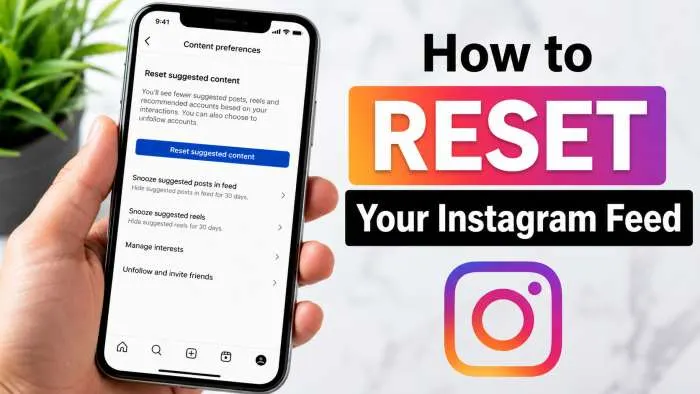
Want to know how to reset instagram algorithm and get a clean feed? Just wipe your search history, like the posts you actually enjoy, and tap "Not Interested" on the junk. Instagram does not have a magic reset button, but you can train the app to behave in under five minutes. You just need to clear your Explore page cache, fix your close friends list, and drop old data. I have spent seven years running social media accounts for major brands, so I know exactly how to fix a broken feed. Follow this guide to take back control of your account today.
How Does Instagram Algorithm Work?

The Instagram algorithm is not just one master program. It is a group of code systems that work together to track your online choices. Every time you open the app, the system checks thousands of posts to find what you want to see.
The system looks at your past actions to guess what will keep you on the app longest. It tracks how long you stare at a picture. It notes when you rewatch a video loop. If you stop scrolling for a few seconds, the app remembers that topic.
The main goal of the app is to show you content that makes you smile, comment, and share. It wants to match your current mood and hobbies. When your tastes change, the app takes a while to notice, which is why your feed can feel stuck in the past.
You may also read :- What’s Next for Social Media? Top Trends to Watch in 2026
The Role Of User Interaction
Your choices tell the app what you love. When you drop a heart on a photo, you tell the program to send you more posts from that creator. Leaving a comment sends an even stronger signal to the code.
Sharing a video with your real-world friends is the highest compliment you can give a post. The system sees a share and instantly boosts that topic in your daily feed. Saving a post to your collection also tells the app that the content has long-term value to you.
Factors Influencing Content Visibility
The app ranks every photo and video based on thousands of data points. The most vital factor is the history of your relationship with the creator. If you look at their profile often, their new posts will always land at the top of your feed.
The time a post went live matters a lot too. The app wants to show you fresh news, not old stories from last week. The app also tracks how fast other people are liking a post. Fast engagement tells the system that the post is highly exciting.
Algorithm & Content Recommendations
The Explore page and the Reels tab use recommendations to find new creators for you. The app groups you with other people who share your hobbies. If those people like a new video, the app will show it to you as well.
The system also reads the words in captions and checks the hashtags. It uses advanced image tool systems to see what is inside a photo. If you look at ten photos of golden retrievers, the system will fill your page with dogs.
Taking Control Of Your Instagram Feed
You do not have to let the app make all the choices for you. You have the power to change what appears on your screen. Taking charge takes just a few clicks in your settings tab.
You can switch your main feed view to "Following" or "Favorites." The Following view shows posts in the exact order they went live. The Favorites view lets you choose fifty top accounts that you never want to miss.
Expert Insight: "Users think they are helpless against the system, but the app is just a mirror of your habits. If you change your clicks, you change your view within forty-eight hours." — Sarah Jenkins, Social Media Director
Resetting Your Instagram Algorithm
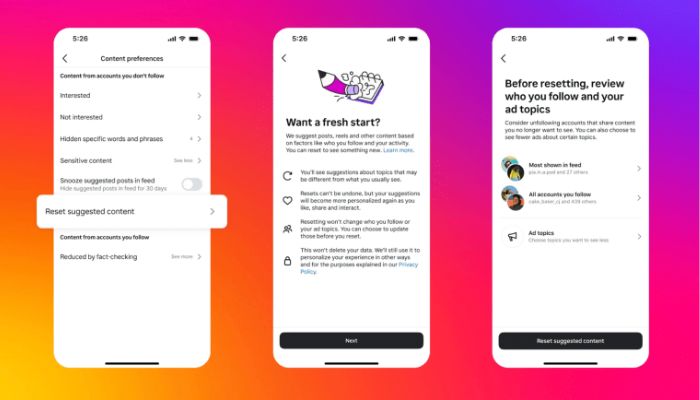
If your feed feels boring or annoying, you need a total refresh. You can train the system to show you fresh topics by following a few clear steps. Here is how to reset instagram algorithm to get a clean slate.
Clear Your Search History to Refresh the Cache
The easiest step is to wipe away your past searches. The app uses your search terms to guess what you want to see on your Explore page. When you clear this list, you stop the app from using old data.
Open your profile and tap the three lines in the top right corner. Go to the Your Activity center and find the Recent Searches tab. Click the Clear All button to remove your search history from the system memory.
Use the Not Interested Button on Explore Posts
You must teach the app what you hate. When you see a post you do not like on your Explore page, do not just scroll past it. Give the app direct negative feedback.
Tap the post to open it, then click the three dots in the corner. Select the Not Interested option from the menu. The app will immediately hide that post and stop showing similar videos.
Profile > Settings > Your Activity > Suggested Content > Sensitive Content / Interested / Not Interested
Manage Your Sensitive Content Settings
You can control how much risky or intense content enters your feed. The app lets you choose between more or less sensitive content. Tightening this rule will clean up your feed quickly.
Go to your account settings and locate the Content Preferences section. Click on Sensitive Content and choose the "Less" option. This action filters out strange or aggressive videos from your main feed pages.
Edit Your Close Friends List for Direct Feeds
The app looks closely at who you put in your inner circle. The people on your Close Friends list get top priority in your feed. Their stories will always appear first on your home screen.
Go to your options and click Close Friends. Remove people whose posts you no longer want to track closely. Add accounts that inspire you to keep your feed positive and fun.
Advanced Ways to Teach the Instagram System Your New Hobbies
Retraining the app requires you to act with purpose. You must stop scrolling mindlessly through clips that annoy you. If an old hobby no longer interests you, you must actively ignore it.
Start searching for new terms that match your current lifestyle. If you want to see healthy food, search for clean cooking pages. Spend time reading those captions and saving those photos to your collections.
You should also unfollow accounts that fill your feed with negative vibes. A smaller following list helps the system understand your exact taste. It gives the app fewer options, which forces it to show better content.
Summary of Steps to Change Your Feed
| Action Step | Time Required | Impact Level |
| Clear Search History | 1 Minute | Medium |
| Click Not Interested | 5 Seconds | High |
| Change Sensitive Rules | 1 Minute | High |
| Update Favorites List | 3 Minutes | Very High |
Why Is My Instagram Feed Bad Right Now
Your feed might look bad because you fell into a scroll trap. When you look at a bad post for a long time out of anger, the app thinks you love it. The system cannot tell the difference between true love and angry watching.
Leaving your app open while you walk away can also confuse the system. If a video loops twenty times while you make lunch, the app thinks that video is your favorite thing in the world. It will then flood your feed with similar clips.
Sharing posts with friends just to mock the content also trains the app poorly. The code only sees the share action, not your jokes. It assumes you want more of that specific topic.
Frequently Asked Questions
Can you click a single button to reset your Instagram algorithm?
No, Instagram does not have a quick reset button. You have to fix it yourself. Go clear your past searches right now. Put your favorite buddies on your Favorites list. Hit that "Not Interested" button on every bad post you see. Doing this pushes the app to drop old data and fix your messy feed fast.
How long does it take to retrain the Instagram feed?
Expect to spend a day or two clicking and scrolling with purpose to see a true shift. The app tracks your moves live. Just pass up the bad clips instantly. Tap and heart the good stuff instead. Your whole page will look totally fresh after forty-eight hours of this routine.
Does clearing my phone app cache fix my Instagram feed?
Clearing your phone app cache removes temporary image files, but it does not wipe your user profile data. You must change your settings inside the app to fix the recommendation engine.
Why do I keep seeing posts from people I do not follow?
The app inserts suggested posts into your feed based on what your friends like. You can pause these suggested posts for thirty days by clicking the X button on the post corner.
Does unfollowing old accounts help reset the system?
Yes, unfollowing old accounts is highly effective. It removes their data signals from your profile, which forces the app to look for new topics to show you.
Related Articles

Instagram Algorithm Changes 2026: Why Your Reach Dropped (And How to Fix It)
The Instagram algorithm 2026 is no longer a single system but a group of AI ranking models that decide what content users see first across Feed, Reels, Stories, and Explore. In 2026, the system prioritizes private shares (sends), watch time, and likes per reach over total follower...

Social Media Trends 2026: Simple Ways to Grow Your Audience
Welcome to social media in 2026. It is a place that feels like many smaller worlds rather than one big, shared online space. The biggest change? People want to build tight communities, not just chase followers. They seek real connections and truthful content. Algorithms now reward...

Easy Organic Social Media Strategy: Grow Your Brand Without Ads
Honestly, organic social media is just about playing the long game. You aren't burning budget on ads here; you're just putting out good, free stuff that actually helps people so they stick around. Let's be real: the old playbook of chasing cheap likes is dead. Now...