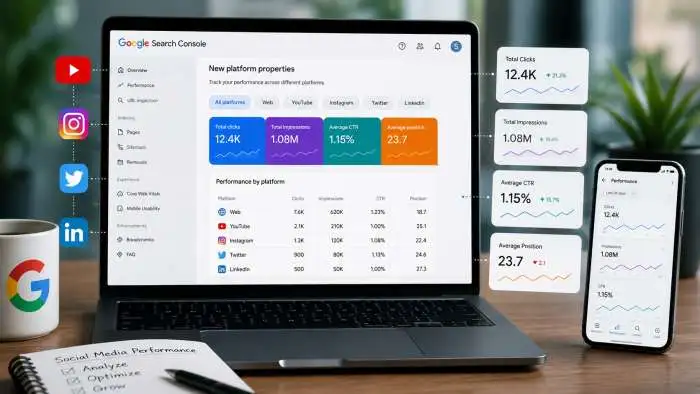
Imagine seeing exactly what people search for on Google before they find your TikTok video or Instagram Reel. That is now possible. Google's new platform properties for Search Console give you this superpower. This feature connects your social media accounts to Search Console. You can see how your posts perform on Google Search, Discover, and News. It is like having a secret window into your audience's mind.
This guide will show you everything you need to know about platform properties for Search Console. You will learn what they are, how to set them up, and how to use the data to grow your audience. This tool is a game-changer for creators and social media managers.
What Are Platform Properties for Search Console?
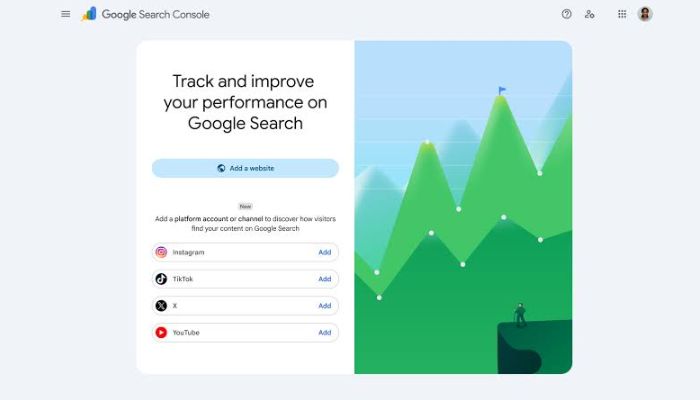
Platform properties for Search Console are a new type of property. In the past, Search Console was only for websites. You could add your domain or a specific URL prefix. Now, you can add your social media accounts. Platform properties for Search Console let you track your presence on supported social and video platforms . These platforms include Instagram, TikTok, X (formerly Twitter), and YouTube .
Think of a property as an asset you want to track. A platform property is your account on one of these supported platforms. For instance, your Instagram handle is a platform property. Your YouTube channel is another platform property. You can add each of your accounts separately . This means you can manage and examine the search performance for each one individually.
You may also read :- What Is the Google Spam Update 2026? Targets and Fixes
How to Set Up Your Platform Properties?
Setting up platform properties is easy. The process is similar to verifying a website. You need to prove you own the account. Here is a step-by-step guide on how to add your platform property in Search Console.
Add Your Platform Property in Search Console
First, log into your Search Console account. Look for the property selector dropdown menu at the top left of the page. Click on it, and you will see an option to "Add property" . Select this option to begin the process.
How to Set Up Your Search Profile?
The verification process is straightforward. Search Console will present you with different property types. Choose the "Platform property" option . Then, select the platform you want to connect. You can choose from Instagram, TikTok, X, or YouTube .
Next, follow the on-screen instructions. You will need to log in to your account on that platform. This securely authorizes the connection . This verifies that you own the account. After a successful connection, Search Console will start collecting data. Your performance history begins from the moment of verification. There is no backfill for past data . So, it is a good idea to add your platforms as soon as possible.
About Platform Properties and How to Set Them Up
For a complete setup, you might add multiple accounts. You can have up to 1,000 properties in your Search Console account . If you manage a brand across different networks, add each one. Each account will become its own separate property. This setup allows you to analyze each platform's performance independently.
One key thing to know is about platform properties and Search Profiles. They are different tools . A Search Profile is a public page. It helps people discover your content on Google. A platform property is for private analytics. It shows you how your content performs in search. They work together but serve different jobs.
What Data Can You See with Platform Properties?
Once you add your platform property in Search Console, a wealth of data appears. You can see how your social and video content performs on Google. This goes beyond in-app analytics. It shows you the search terms people use to find your posts. You can answer the question, "how to analyze your social and video content performance" with this tool. Here is what you can analyze.
Search Performance Data
The Performance report is your main hub. It shows total clicks and impressions for your content . You can see which of your posts are getting the most visibility on Google Search. You can also see data from Google Discover and Google News . This helps you understand where your content is showing up.
Understanding Your Search Audience
The Insights report helps you understand your audience . It identifies the top query groups sending traffic to your posts. You can see which search themes are trending up. This shows you what your audience cares about right now. This data is pure gold for content ideas. It can inspire your next video topic, caption, or hashtag strategy .
Spotting Trending Content
The 24-hour filter is a powerful tool. It lets you identify sudden traffic spikes from Google Search . If one of your recent posts gets a big spike, you can act fast. You can cross-promote that trending content on your other platforms. This helps you maximize the visibility of a winning post.
How to Analyze Your Social and Video Content Performance?
This data is powerful, but only if you know how to use it. Here are practical ways to analyze your social and video content performance using Search Console.
Cross-Platform Analysis
You can export performance data from multiple properties. Put the data into a single spreadsheet . This allows you to compare your performance side by side. You can see how your content performs on YouTube versus Instagram. You can analyze which platform is driving the most search traffic for your brand. This is a key part of how to analyze your social and video content performance effectively.
Optimize Existing Content
Use Search Console to guide your content strategy. Look for older videos that are regaining search traction . This indicates which posts you might want to pin to your feed. It might also be a sign to create a part two. You can also use annotations. You can log when you rewrite a YouTube title or TikTok caption . Then, you can compare performance before and after the change. This shows you if your optimizations are working.
Compare Different Formats
The platform properties data helps you understand formats. You can use comparison mode to evaluate different types of content . For example, you can compare the search traffic of your video playlists. You could also contrast the performance of short-form versus long-form videos. This insight helps you create more of what your audience wants.
Expert Tips for Using Platform Properties
The data from platform properties is meant to be used. Here are some expert tips to get the most out of the tool.
Act Quickly on Data
You cannot recover past data. Connect your accounts today to start building a history . The sooner you verify, the sooner you can start learning. Even if you are not ready to act, set it up. You will have months of valuable trend data to study later.
Use Data for Content Inspiration
The Insights report is a direct line to your audience. When you see trending search queries, use them. Create new content based on what people are searching for. This ensures your content is always relevant. It is a data-driven way to plan your strategy.
Track Your Progress
The Achievements report tracks your milestones . It will notify you when you reach a new click threshold. This is a great way to celebrate wins. It also helps you track the growth of your search presence over time.
Frequently Asked Questions
What are platform properties for Search Console?
Platform properties are a new type of property in Search Console. They allow you to track the search performance of your social media accounts. Supported platforms include Instagram, TikTok, X, and YouTube . This is separate from website properties.
How do I add a platform property to Search Console?
To add your platform property in Search Console, go to the property selector dropdown and click "Add property." Choose "Platform property" and select your platform. Then, follow the on-screen prompts to authorize the connection .
Does Search Console show my in-app analytics for Instagram or TikTok?
No. Platform properties for Search Console do not show in-app analytics. They only measure how your content performs on Google Search, Discover, and News. It shows you the search terms that lead people to your posts .
Do I need a website to use platform properties?
No, you do not need a website. Platform properties are designed for creators and publishers who post on social and video platforms. It is available even to those who have no website of their own . Search Console is no longer just for site owners.
How is a platform property different from a Search Profile?
A Search Profile is a public page. It helps people discover you on Google. A platform property is a private analytics tool. It shows you how your content performs. They are different tools for different jobs .
When will I see data in my new platform property?
Data collection starts immediately after verification. However, there is no backfill for past data. It may take a few days for the initial reporting to appear. Your performance history begins at the moment of verification .
Related Articles

How Do You Optimize for AI Search? Essential Strategies Explained
If you want to know how to optimize for AI search, here is the simple answer: focus on creating clear, helpful, and well-structured content that answers real questions. AI systems like ChatGPT, Google's AI Overviews, and Perplexity look for content that is easy to understand, trustworthy,...

Local GEO Baseline Audit Guide: Benchmarking AI Visibility
Are you invisible to AI? A local GEO baseline audit shows exactly how AI tools like ChatGPT, Gemini, and Perplexity see your business. This audit is the starting point for all your AI search efforts. You will benchmark your current visibility, find data errors, and learn how...

How to Build an AI Content Strategy That Actually Ranks and Converts
An effective ai content strategy means creating content that answers user questions directly and clearly so AI systems can easily find and cite it. This approach helps you show up in AI Overviews and other AI-powered search results. The goal is to become the go-to source for...