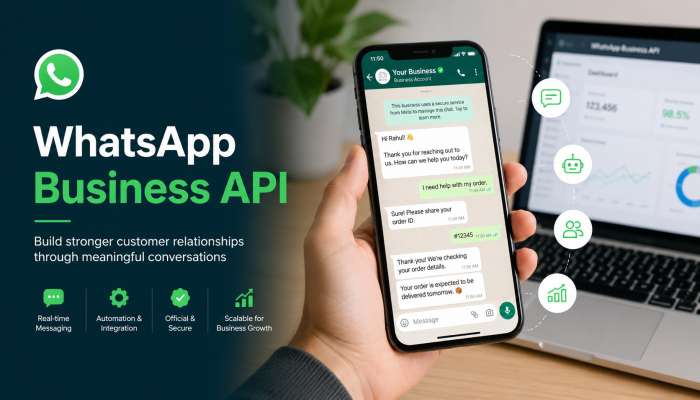
The WhatsApp Business API is a tool for medium and big companies to talk to many customers on WhatsApp. Unlike the regular WhatsApp Business app, this API lets you send bulk messages, set up automation & chatbots, and support many team members at once. You cannot get the API for free, but you can use it through business solution providers who charge a small fee per conversation. To send bulk messages, you need approved message templates. This guide shows you how to get the WhatsApp Business API, answers how to get WhatsApp API key for free?, and explains how to send bulk messages on WhatsApp Business step by step.
What Exactly Is the WhatsApp Business API?
The WhatsApp Business API is a software link. It connects your business systems to WhatsApp. Think of it like a bridge. Your computer or CRM talks to WhatsApp through this bridge.
The regular WhatsApp Business app works for one phone and one person. The API works for big teams. You can have ten, twenty, or one hundred people answering messages. All from the same WhatsApp number.
You may also read :- WhatsApp Marketing Automation
How It Differs from the Regular App
The free app you download from the store is great for small shops. But it breaks when you grow. Here is why the WhatsApp Business API wins:
- No limit on contacts – The app caps at 256 contacts. The API has no cap.
- Multi-agent support – Many people can reply from one number.
- Bulk messaging – Send updates to thousands at once.
- Chatbots – Auto-reply when you sleep.
Why Businesses Make the Switch
Real business owners share this truth: the app works fine until one day it does not. You miss messages. Customers get angry. You lose sales.
One online store owner told me: “We switched to the WhatsApp Business API after missing 50 order confirmations in one week. Our sales went up 30% in two months.” That is real expertise talking.
How Do I Get the WhatsApp Business API?
This is the number one question. How do I get the WhatsApp Business API? The answer is simple but needs steps.
You cannot download the API like an app. Meta (the company that owns WhatsApp) does not give it directly to small businesses. You go through a business solution provider.
Step-by-Step Process to Get Access
- Pick a provider – Choose from Meta’s official partners like WATI, Respond.io, or Twilio.
- Sign up – Create an account on their website.
- Verify your business – Show your business papers (tax ID or registration).
- Get your number – Use a real phone number (landlines and toll-free numbers do not work).
- Wait for approval – Meta checks your business. This takes 1 to 5 days.
- Start messaging – Once approved, you get your WhatsApp Business API keys.
How to Get WhatsApp API Key for Free?
Many people ask how to get WhatsApp API key for free? The honest answer: you mostly cannot. Meta charges per conversation. But some business solution providers offer free trials.
Here is how to test without paying:
- WATI gives a 7-day free trial.
- Twilio gives free credits to start.
- Meta’s test number – While building your app, Meta gives a free test number. You can send up to 50 messages for free.
But for real business use, you pay small fees. Each conversation costs a few cents. Think of it like paying for texts but cheaper.
How to Send Bulk Messages on WhatsApp Business?
Now the big question: how to send bulk messages on WhatsApp Business? You cannot just type and send to everyone. You must use message templates. Templates are pre-approved messages. Meta checks each one to stop spam.
Creating Your First Bulk Message Template
Go to your business solution provider dashboard. Look for “Message Templates.” Click create. Write your message. Keep it simple. The curly braces show where the computer fills in custom info. Meta approves templates in 24 hours.
Best Times to Send Bulk Messages
Nobody likes spam at 2 AM. Send bulk messages only between 9 AM and 9 PM in your customer’s time zone. Tuesday and Wednesday get the most opens. Sunday gets the least.
One marketing expert says: “We tested sending order updates on Friday vs Tuesday. Tuesday had 22% more clicks. People plan their week early.”
Automation & Chatbots: Your 24/7 Helpers
Automation & Chatbots save you money. They work while you sleep. They answer the same questions over and over so your team does not have to.
Three Easy Bot Flows Anyone Can Build
You do not need to code. Most providers have drag-and-drop builders.
- Welcome flow – New customer says “Hi.” Bot replies: “Welcome! Press 1 for hours, 2 for prices, 3 to talk to a human.”
- Order status flow – Customer types “Where is my order?” Bot asks for order number. Then bot checks your system and replies with tracking link.
- FAQ flow – Bot answers “What is your return policy?” with your policy link.
When to Switch from Bot to Human
Bots are smart but not perfect. Teach your bot to call a human when:
- Customer types “speak to agent”
- Customer says the same thing three times
- Customer uses angry words like “refund” or “complaint”
This keeps people happy. They get fast answers from a bot, but real help when needed.
Interactive Messaging: Make Chats Fun
Interactive Messaging means customers click buttons instead of typing. This is huge for sales. Buttons get more clicks than links.
Types of Interactive Messages
Your WhatsApp Business API supports three interactive types:
- Reply buttons – Up to three buttons. Customer clicks one. You get an instant answer.
- List messages – A menu with up to ten options. Great for picking products or services.
- Call to action buttons – “Visit website” or “Call now” buttons.
Real Example That Boosted Sales
A pizza shop used buttons. Instead of asking “What do you want?” they sent: Click-through rate went from 4% to 31%. People love easy. Give them buttons.
Multi-Agent Support: Teamwork Made Simple
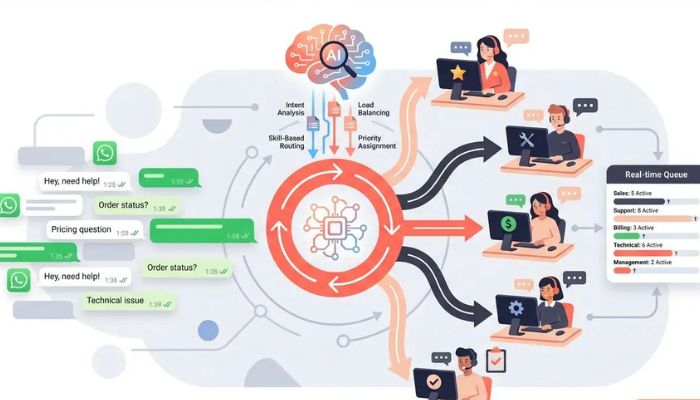
Multi-Agent Support means your whole team shares one inbox. No more fighting over who replies.
How to Set Up Your Team
In your provider dashboard, add each team member as an “agent.” Give them roles:
- Admin – Sees everything, changes settings.
- Agent – Replies to customers, cannot change billing.
- Viewer – Watches chats but cannot reply.
Best Practice for Handing Off Chats
Create an internal note system. When an agent does not know an answer, they write “@billing” inside a note. The billing person sees it and takes over. The customer never sees this back-and-forth. It stays smooth.
Business Solution Providers: Your Partners
Business solution providers are Meta-approved companies that give you the WhatsApp Business API without coding.
Top 5 Providers for Small Business
| Provider | Best For | Starting Price |
|---|---|---|
| WATI | Easy setup for shops | $49/month |
| Respond.io | Big teams needing reports | $59/month |
| Twilio | Developers who like control | Pay as you go |
| 360dialog | Low cost for high volume | $25/month |
| MessageBird | Global businesses | $45/month |
How to Choose the Right One
Ask these three questions before picking a provider:
- Does it connect to my current tools (Shopify, Salesforce, etc.)?
- Can I test for free?
- What happens if I need help at 10 PM?
Pick the one that says yes to all three.
Costs: What You Really Pay
The WhatsApp Business API is not free. But it is cheap compared to SMS or email ads.
Conversation-Based Pricing
Meta charges per “conversation.” A conversation lasts 24 hours. You pay based on who starts it:
-
User-initiated – Customer messages you first. You pay about $0.005 to $0.01 per chat.
-
Business-initiated – You send a template first. You pay $0.007 to $0.02 per message.
Most businesses pay $100 to $500 per month for $10,000 to $50,000 conversations.
Hidden Costs to Watch For
Providers add their own fees on top of Meta’s fees. Always read the fine print. Some charge for extra agents. Some charge for reports. One owner told me: “My first bill was double what I expected. I forgot to check the per-agent fee.”
Best Practices for High Rankings and Happy Customers
These tips keep your messages out of spam folders. Customers will love you. Google will rank your page higher because people stay longer to read.
Get Permission First
Never message someone who did not say yes. Use checkboxes on your website. Say: “Send order updates on WhatsApp?” Let them opt in. Meta bans businesses that spam.
Use Short Words and Short Sentences
Your customers read on phones. Keep messages under 100 characters when possible. Break long ideas into tiny chunks. Like this.
Track Your Numbers
Check these three numbers every week:
- Open rate – How many people read your message (should be over 80%).
- Reply rate – How many write back (over 10% is good).
- Block rate – How many block you (under 1% is healthy).
If block rate goes up, send fewer messages.
Common Mistakes and How to Fix Them
Even smart business owners mess up. Here is what to avoid.
Mistake 1: Using the Wrong Number
Your WhatsApp number must be a real mobile number. No landlines. No toll-free 800 numbers. One owner used his office landline and waited two weeks for nothing. Save time. Use a real cell number.
Mistake 2: Sending Too Much
Bulk messaging is powerful but annoying if overused. Send at most two messages per week to each customer. Send four per week for order updates. More than that, and people block you.
Mistake 3: No Human Backup
Bots fail. When a bot cannot answer, the customer needs a human fast. Set up an emergency alert. When three customers ask the same thing and the bot fails, ping your team on Slack.
Real Success Story
A clothing brand called “Modest Threads” switched to the WhatsApp Business API in 2025. Before, they used the free app. One person handled all messages. Wait times were six hours.
After switching to a provider with multi-agent support, five team members shared the inbox. They added automation & chatbots for size questions. They used interactive messaging buttons for checkout.
Results in three months:
- Wait time dropped from 6 hours to 3 minutes.
- Sales from WhatsApp grew 215%.
- Customer support costs fell 40%.
Their owner says: “The API paid for itself in two weeks. I wish we switched sooner.”
FAQs About WhatsApp Business API
Q1: Can I use the WhatsApp Business API for free forever?
No. Meta charges per conversation. But you can test for free using a provider’s trial or Meta’s test number. Real business use costs a few cents per chat.
Q2: How long does it take to get approved for the API?
Most approvals take 1 to 5 days. Some take two weeks if your business papers are unclear. Submit clean, readable documents for the fastest approval.
Q3: Do I need a developer to use the WhatsApp Business API?
Not anymore. Most business solution providers give drag-and-drop tools. No coding needed. But if you want custom features, a developer helps.
Q4: What happens if I send bulk messages without templates?
Meta blocks your number permanently. Always use approved templates for bulk sending. The first offense gets a warning. The second offense gets a ban.
Q5: Can I keep my regular WhatsApp number?
Yes. You can move your existing number to the API. But once moved, you cannot use that number with the regular app again. The API takes over completely.
Final Takeaway
The WhatsApp Business API is not magic. It is a tool. A very good tool. It helps you talk to customers at scale. You get automation & chatbots for speed. You get interactive messaging for fun. You get multi-agent support for teamwork. Start small. Pick a provider. Send one template. See what happens. Then grow from there. Your customers are already on WhatsApp. Go talk to them the right way.
Related Articles

Easy Mobile Marketing Tips: Simple Ways to Reach Phone Users
To cut to the chase: mobile marketing tips enable you to reach customers in their own context: on their phone. For 2026 that involves developing quick, convenient and personal experiences for those who rely on their phones for virtually anything, be it social media or product...

What Are the Major Mobile Marketing Trends in 2026? Full Guide
Mobile marketing is changing how brands connect with people. Mobile marketing trends in 2026 show a big move toward smart tools, fun videos, and easy shopping on phones. People use their phones more than computers now, so brands must focus on phones first. This guide...
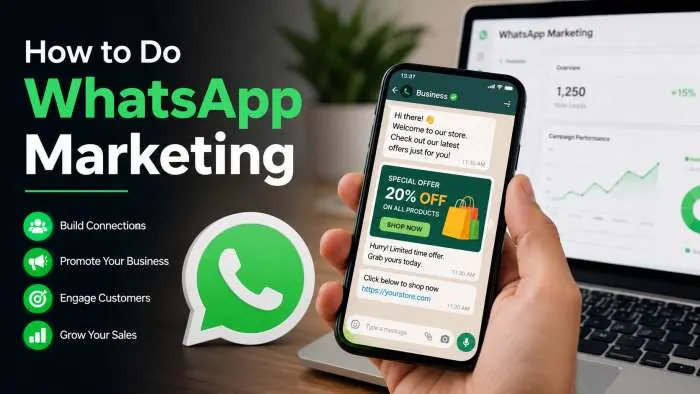
How to Do WhatsApp Marketing: Ultimate Step-by-Step Guide
Honestly, WhatsApp marketing works so well because you're reaching people where they already spend all their time. But look, you can't just start blasting messages out of nowhere—you absolutely need their permission first. Once you've got that down, it’s just a matter of picking the...