
Most SEO advice you find online was written for companies with a marketing team, a developer on call, and a budget for paid tools. You have none of that. You have a business to run.
This guide is different. It focuses on what a small business owner can actually do, in the order that makes sense, without hiring an agency or buying software you don't need.
Start With the Searches That Already Belong to You

Before you write a single blog post or touch a meta tag, figure out what people type into Google before they find a business like yours. That sounds obvious. Most people skip it anyway.
The mistake small businesses make is chasing broad terms. A pet supply shop in a mid-sized city will not outrank Chewy for "dog beds." But that same shop can absolutely own "what kind of bed does a golden retriever need" or "best orthopedic bed for older labs."
These specific phrases are called long-tail keywords. They have lower search volume, which sounds bad until you realize that the people typing them know exactly what they want. A visitor who searched a four-word question is far more likely to buy than someone who typed a one-word category.
Open Google. Type your service or product, then start adding words a real customer would use. "Emergency plumber open Sunday." "Bookkeeping for real estate agents." "Custom cake small order." Watch what Google suggests in the autocomplete dropdown. Those suggestions are real queries from real people. Write them down.
You do not need a paid keyword tool for this. Google Search Console, which is free, shows you the exact phrases people already use to find your site. If you have not set it up, do that today. It takes ten minutes and gives you data you cannot get anywhere else.
Read Also: How Do You Optimize for AI Search? Essential Strategies Explained
Fix the Pages You Already Have Before Writing Anything New
Here is a pattern I see constantly. A small business owner decides to "do SEO," so they start a blog. Six months and twenty posts later, nothing has changed. Meanwhile, their homepage still says "Welcome to Our Website" and their service pages have no clear descriptions.
Search engines read your existing pages first. If those pages are vague, no amount of blog content will fix the problem.
Pull up your homepage. Read the main headline out loud. Does it say what you do and who you do it for? If a stranger landed on this page with no context, would they understand your business in five seconds?
Now open each service page. Each one should name the service plainly, describe who it is for, and explain what happens when someone hires you. If you run a cleaning company, the page should say "House Cleaning for Busy Families in [City]" not "Solutions for Your Home."
This is not about keyword density. It is about clarity. Google's own guidance says the best thing you can do is create content that helps people. A page that clearly explains your service helps people. A page stuffed with repeated phrases does not.
While you are in there, check your page titles. The title is what shows up as the blue clickable link in search results. If every page on your site has the same title, or a title that says "Home," fix that. Each page needs its own title that describes what is on that page.
Your Google Business Profile Matters More Than You Think
If you serve customers in a specific geographic area, your Google Business Profile is not optional. It is often the first thing people see when they search for a local business, and it directly feeds into Google Maps results.
Claim it if you have not already. Then fill it out completely. That means:
- Your exact business name, matching what is on your signage and your website
- Your address or service area, depending on how you operate
- Your phone number
- Your hours, including special holiday hours
- Photos of your actual location, your team, or your work
- A description that explains what you do in plain language
Accuracy matters more than cleverness here. If your website says you open at 8am and your Google profile says 9am, that inconsistency hurts you. Google wants to trust your information. Conflicting details erode that trust.
Reviews are the other half of this. Ask satisfied customers to leave a review. Do not script them or offer incentives. Just ask. A steady trickle of honest reviews signals that your business is active and real. When someone searches "plumber near me" and sees two options with similar ratings, the one with fifty recent reviews usually wins the click.
Write Content That Answers One Question Well
Now we get to the part most people think of as "SEO": creating content. This is where small businesses either build a real asset or waste a year producing words that no one reads.
The rule is simple. One page answers one question. Not five questions. Not a broad topic. One specific thing a customer wants to know.
If you are a CPA, do not write "A Guide to Small Business Taxes." Write "How to Pay Yourself as an S-Corp Owner." If you are a landscaper, skip "Landscaping Tips" and write "What to Plant in Shade That Survives Winter."
Each article should start by answering the question directly. The first two sentences should give the reader the answer they came for. Then you can explain the reasoning, add context, and link to your service page if it is relevant. This structure serves two purposes. It satisfies human readers who want a quick answer. And it makes your content easy for AI tools and featured snippets to pull as a direct response.
How long should an article be? Long enough to answer the question completely. No longer. Google explicitly says there is no preferred word count. A question that needs three hundred words gets three hundred words. A question that needs two thousand gets two thousand. Padding an article to hit a number is the fastest way to make it useless.
One more thing. Do not write about topics just because they seem popular. Write about questions your actual customers ask. Keep a running list on your phone. Every time someone calls with a question, write it down. That list is your content calendar.
You May Also Like: SEO Priorities for AI Search: How to Rank in ChatGPT and Perplexity
Make Your Site Easy to Read on a Phone
More than half of all web traffic comes from mobile devices. If your site is hard to use on a phone, people leave. Google notices when people leave.
You do not need a technical audit to check this. Pull out your phone. Open your website. Can you read the text without zooming? Are the buttons big enough to tap? Does the page load in under three seconds on a decent connection?
If the answer to any of those is no, fix it. Most modern website platforms handle this automatically, but older sites or heavily customized themes can have problems. A slow, clunky mobile site hurts you in two ways. Visitors bounce, and Google's systems notice the bouncing.
Earn Links by Being Worth Mentioning
Backlinks, which are links from other websites to yours, still matter. They act as votes of confidence. But the way small businesses should pursue them has changed.
Do not buy links. Do not trade links with a directory farm. Those tactics worked once. They do not work now, and they can actively hurt you.
Instead, look for opportunities that happen naturally when you are visible in your community. If you sponsor a local event, the organizer's website will often link to yours. If you are quoted in a local news article, that article will link to your business. If you partner with a complementary business, you can link to each other's sites in a way that makes sense for both audiences.
You can also create something worth linking to. A simple, genuinely useful resource on your site, like a checklist, a pricing guide, or a local area guide, gives other people a reason to link to you without you asking. This takes longer than buying links. It also does not put your site at risk.
Give It Time, and Do Not Panic
SEO is not a switch you flip. It is a slow process of making your site clearer and more useful, one piece at a time.
Some changes show results in days. A new Google Business Profile photo or an updated service page description might shift things quickly. Other changes, like building authority through content and links, take months.
The worst thing you can do is change everything at once, see no results in two weeks, and then change everything again. That pattern tells Google your site is unstable. Pick one thing. Fix it. Wait a month. Look at your Search Console data. Then decide what to do next.
Small businesses have an advantage that large companies do not. You know your customers personally. You hear their questions every day. You understand the specific problems they have and the exact words they use to describe those problems. That knowledge is the foundation of good SEO. The technical stuff is just structure around it.
Related Articles
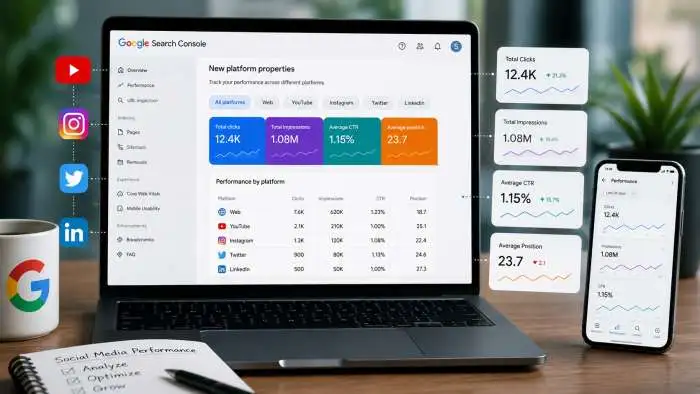
Track Your Instagram, TikTok and YouTube Traffic in Google Search Console
Imagine seeing exactly what people search for on Google before they find your TikTok video or Instagram Reel. That is now possible. Google's new platform properties for Search Console give you this superpower. This feature connects your social media accounts to Search Console. You can...

How Do You Optimize for AI Search? Essential Strategies Explained
If you want to know how to optimize for AI search, here is the simple answer: focus on creating clear, helpful, and well-structured content that answers real questions. AI systems like ChatGPT, Google's AI Overviews, and Perplexity look for content that is easy to understand, trustworthy,...

Local GEO Baseline Audit Guide: Benchmarking AI Visibility
Are you invisible to AI? A local GEO baseline audit shows exactly how AI tools like ChatGPT, Gemini, and Perplexity see your business. This audit is the starting point for all your AI search efforts. You will benchmark your current visibility, find data errors, and learn how...